


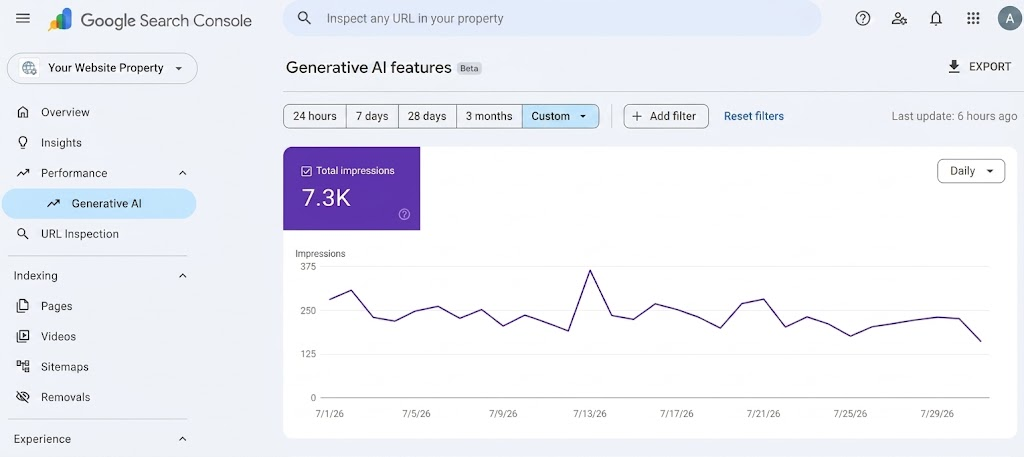
Imagine waking up to discover that Google’s AI is recommending your business to thousands of daily searchers, but you have no idea which pages it is choosing or why.
For months, business owners and marketers were essentially flying blind when it came to AI Overviews and AI Mode. You knew AI search was taking up real estate at the top of Google, but you couldn’t separate that visibility from traditional “blue link” search traffic.
That blind spot is finally disappearing. With the rollout of the Generative AI Report in Google Search Console, Google has opened the curtain, giving site owners an isolated, dedicated view of how their content performs inside conversational search features.
Whether you are logging into Google Search Console for the very first time or looking to turn this new data into revenue, this guide breaks down everything you need to know.
If you are new to Google Search Console (GSC), think of it as your website’s free dashboard directly from Google.
It shows you how often your site shows up in search results, what keywords bring people to you, and whether your pages have technical issues.
The Generative AI Report is a brand-new tab nestled directly under the Performance menu in your left-hand sidebar. If you don’t see it yet, don’t panic!
Google is rolling this feature out in phases, and John Mueller from Google confirmed that a domain must hit a minimum threshold of AI search impressions before the report populates.
An impression is logged whenever a link to your URL is rendered inside an AI feature (such as an AI Overview or AI Mode answer block) and scrolled into the user’s view.
Google purposely separates these numbers from your standard search totals. This means you can see exactly how much visibility comes from AI without confusing it with traditional search results.
You can segment your data by specific web pages, country of origin, device type (desktop vs. mobile), and date ranges down to daily or hourly metrics.
To keep expectations realistic, Google currently keeps this report focused strictly on impressions.
You will not see click counts, click-through rates (CTR), or the exact prompts users typed into the search bar. While that might feel limiting, measuring your pure visibility in AI answers is the crucial first step to winning in modern search.
If you are opening this report for the first time, seeing raw impression numbers can feel overwhelming.
Follow this simple 4-step framework to extract real insights without getting lost in the data:
Before comparing your AI impressions against your regular web search performance, make sure both reports are set to the exact same date range.
Because the Generative AI report is newer, its historical data might not go back as far as your main performance report.
Comparing 30 days of AI data against 90 days of web data will give you inaccurate results!
How much of your total search presence is driven by AI? You can calculate your AI Visibility Share using this straightforward formula:

If your site earned 5,000 Generative AI impressions and 50,000 Total Web Search impressions in the same timeframe, your AI Visibility Share is 10%.
Scroll down to the Pages table inside the report. You will quickly notice a trend: AI visibility is highly selective.
While classic search might spread impressions across hundreds of your pages, Google’s AI usually leans heavily on a small handful of top authoritative pages (often capturing 80% to 90% of your total AI volume).
Note which formats Google’s AI prefers on your site. Usually, these are practical “how-to” guides, direct definitions, pricing breakdowns, and side-by-side comparisons.
Pages like homepages, general event announcements, or navigation pages rarely trigger AI citations because users searching for direct answers aren’t looking for broad landing pages.
Here is a technical trap that catches many first-time users: Google assigns AI impressions to the canonical URL (the primary version of a page) that it selects, not necessarily the exact URL a visitor landed on.
If you run a multi-language or multi-regional site, a misconfigured canonical tag might attribute all your AI impressions to your English page even when Spanish users are viewing it.
Use GSC’s URL Inspection Tool to verify that Google recognizes your intended canonical pages.
To understand why this data matters, let’s look at how local businesses across Florida can use these insights to outmaneuver competitors in local search:
Imagine running a luxury real estate agency in South Florida. You might assume your sleek homepage carries all the weight, but your Search Console data reveals something surprising: 85% of your generative AI impressions are actually driving to a blog post comparing Brickell and South Beach.
That’s Google telling you its AI trusts your localized lifestyle insights to answer buyer questions. To build on that momentum, you can create dedicated guides for neighborhoods like Wynwood or Coral Gables, structuring them with direct Q&A blocks to catch high-intent movers right as they compare options.
Take a boutique resort operating near Orlando’s major attractions. When checking their report, they notice Google’s AI Overviews routinely pull answers from their guide on family-friendly day trips near theme parks.
Rather than leaving that traffic on autopilot, the resort can polish that piece with clear bullet points, amenity callout boxes, and direct booking perks.
When Google highlights those exact recommendations in AI answers, readers get a seamless bridge straight to the booking engine.
Consider a Tampa HVAC contractor who notices zero AI visibility for generic terms like “AC repair,” but sees massive impression spikes for an in-depth troubleshooting guide on indoor AC leaks.
The AI isn’t looking for a basic sales pitch, it wants specific solutions. By adding a quick “Emergency Troubleshooting Checklist” near the top and pairing it with a prominent 24/7 service CTA button, the contractor transforms passive informational impressions into immediate service calls.
As AI reshapes the digital landscape, Google isn’t the only platform introducing AI analytics.
Understanding how Google’s approach compares to other major platforms helps you build a well-rounded strategy:
| Feature / Capability | Google Search Console (Generative AI) | Bing Webmaster Tools (AI Performance) | GA4 (AI Assistant Channel) & Third- Party GEO Tools |
|---|---|---|---|
| Primary Focus | Volume & Visibility (Impressions) | Deep Intent & Citation Share | Referral Traffic & Prompt Tracking |
| Search Volume | Massive (Dominates global search) | Moderate (Smaller market share) | N/A (Tracks external referral links) |
| Key Metrics | Isolated Impressions, Pages, Devices, Countries | Citations, Grounding Queries, Intent Topics | Referral Sessions, Conversions, Prompt Tracking |
| Click & Query Data | Currently Not Included | Includes sampled grounding queries | Tracks clicks referred by external AI (ChatGPT, Claude) |
Microsoft’s Bing Webmaster Tools actually beat Google to the punch by offering deeper analytical tools, such as showing exact grounding queries and citation percentages. However, Google controls the vast majority of worldwide search volume.
While Bing serves as a fantastic “intent laboratory” to test what questions AI models ask, Google’s Generative AI report gives you the actual scale. Knowing how often your brand appears in front of Google’s massive audience is essential for protecting your market share.
Navigating the shift from traditional SEO to Generative Engine Optimization (GEO) requires more than just looking at charts—it requires converting AI visibility into paying customers.
At Expresso Company, we specialize in helping businesses stay ahead of search engine updates.
We don’t just optimize for traditional keyword rankings; we structure your entire digital footprint so that Google’s AI models recognize your brand as the definitive authority in your industry.
We craft structured, authoritative content designed specifically to be picked up and cited by Google’s AI Overviews and conversational features.
From resolving complex canonical conflicts to optimizing structured schema data, we ensure Google’s crawlers index your pages flawlessly.
We provide end-to-end digital growth solutions, including Technical SEO Audits, Custom Web Development, Content Marketing, and High-ROI PPC Campaigns.
We turn confusing Search Console data into clear, revenue-driving strategies tailored to your business goals.
Is your business ready to dominate the new era of AI search? Contact Expresso Company today to request your custom AI Search Audit and discover how we can elevate your brand’s digital presence!
No. Google explicitly designed its generative AI controls independently from its core ranking algorithms. If you choose to opt out of AI features using the Search Console controls or snippet tags, your traditional “blue link” rankings and organic search positions remain completely unaffected.
Third-party SEO tools estimate AI citations by running sample prompts through search engines at set intervals. Google Search Console, on the other hand, logs actual, real-time impressions served directly to live users on Google’s network. Think of third-party tools as market estimations and Search Console as your verified, first-party source of truth.
Not automatically. Currently, Google has not released native API endpoints or BigQuery bulk export support specifically for the isolated Generative AI search type. For now, the best way to back up and track your historical data is by exporting CSV or Google Sheets reports directly from the interface on a regular schedule.
A weekly or bi-weekly cadence is ideal. Generative AI answers update dynamically as Google refreshes its information retrieval models. Reviewing your performance every 7 to 14 days lets you quickly spot if a high-value URL has gained or lost citation status, giving you time to refresh your content before competitors jump ahead.
Yes. If a user engages in a conversational search session in AI Mode and refines their question, any URL that remains rendered and visible in the answer block for the new response will log an additional, distinct impression.

