



Getting approved for TikTok Shop should feel like progress toward selling, not like navigating unclear paperwork. Still, many sellers experience delays because they rush onboarding, misunderstand what TikTok is reviewing, or submit documents without fully preparing them.
The truth is that TikTok Shop onboarding is not difficult, but it is precise. TikTok evaluates sellers carefully because commerce happens directly inside content, not on a separate website. That means trust, compliance, and accuracy matter from the very first step.
This guide walks you through the full TikTok Shop onboarding checklist, explaining exactly what TikTok looks for at each stage, why each step exists, and how to complete it correctly so you can move from application to selling without unnecessary delays.
Before getting into the steps, it helps to understand TikTok’s mindset.
TikTok Shop is built into videos, livestreams, and creator content. Buyers do not leave the app to complete purchases.
Because of this, TikTok must protect both customers and creators by ensuring that every seller is legitimate and compliant.
As a result, onboarding is designed to verify three things:
When sellers rush this process or submit incomplete information, TikTok pauses approval until everything aligns. That is why preparation matters more than speed.
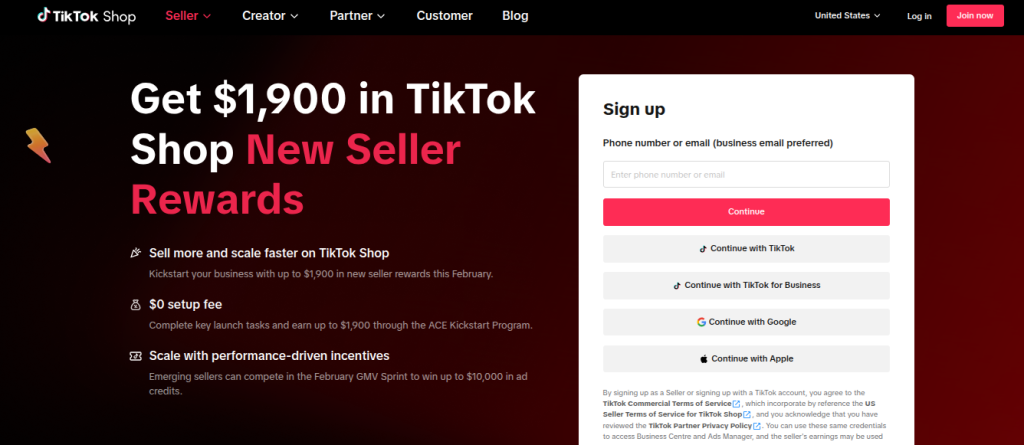
The onboarding process begins in TikTok Shop Seller Center, which is TikTok’s official platform for merchants.
At this stage, you are not just creating a login. You are defining how TikTok will treat your account moving forward.
You will need to:
This step matters because TikTok uses this information to determine document requirements, tax rules, and payout eligibility.
A common mistake is selecting the wrong seller type or country, which can force you to restart the application later.
Before continuing, confirm that your TikTok account, business location, and intended seller type all match your real situation.
Once your account is created, TikTok requires identity verification to confirm who owns and controls the shop.
For individual sellers, this means uploading a government-issued ID. For business sellers, this means submitting official registration documents that show the business exists legally.
TikTok reviews this step carefully. They check:
One of the most common delays happens here. Sellers often submit documents where names are abbreviated, addresses are formatted differently, or files are cropped or blurry. Even small inconsistencies can trigger manual review.
To avoid delays, make sure your documents are clean, complete, and match your seller account exactly.
After identity verification, TikTok asks for detailed business information.
This includes:
This step is not just for communication. TikTok cross-checks this information against your identity documents, tax records, and connected platforms like Shopify.
If your business name on Shopify does not match what you enter here, or if your address differs from your tax documents, TikTok may pause approval and request clarification.
For this reason, it is best to decide on one consistent version of your business information and use it everywhere.
Tax documentation is one of the most sensitive parts of TikTok Shop onboarding because it directly affects payments.
Depending on your seller type and country, TikTok may request:
TikTok uses this information to ensure compliance with local tax laws and to determine whether payouts can be issued.
Many sellers treat this step as a formality. However, incorrect or incomplete tax information can delay approval or prevent payouts later, even after your shop is live.
Submitting accurate tax documents during onboarding saves you from payment issues once sales begin.
By this point, most sellers feel ready to submit. However, this is where many delays happen.
Before clicking submit, TikTok expects that:
A frequent mistake is uploading the correct document to the wrong field. Another is submitting files with low resolution or missing pages.
Taking a few extra minutes to review each upload carefully can prevent days of waiting for re-verification.
Once approved, TikTok allows sellers to connect an eCommerce platform.
For Shopify users, TikTok recommends the TikTok for Shopify channel app, which helps you:
This step is optional, but it becomes essential as your product catalog grows. Without integration, managing products manually increases the risk of errors that can affect visibility or compliance.
Connecting your store early helps ensure a smoother launch.
Before listing products, TikTok reviews whether your products meet platform guidelines.
TikTok evaluates:
Many sellers skip this step and only react after a product is removed. Reviewing these rules early helps avoid listing rejections and interruptions once your shop is active.
TikTok Shop onboarding is not subjective, but it is strict. The platform reviews applications based on completeness, accuracy, and consistency across multiple data points. When sellers follow a structured checklist, they reduce uncertainty and remove common friction points that slow down approval.
More importantly, a checklist forces you to think ahead. Instead of uploading documents one by one and reacting to issues as they appear, you prepare everything in advance. This proactive approach allows TikTok’s review system to process your application smoothly, without repeated pauses for clarification.
In addition, a checklist helps sellers understand how each step connects to the next. Identity verification affects tax approval. Business information affects payouts. Store connections affect product accuracy. When these pieces align, approval becomes significantly faster.
Approval is not the end of the process. In many ways, it is the starting point.
Once your TikTok Shop is live, TikTok continues to monitor seller behavior, product compliance, and data accuracy. Inconsistent pricing, missing product details, or outdated tax information can still cause issues later.
Because of this, the preparation you do during onboarding sets the foundation for long-term success. Sellers who treat onboarding as a one-time task often struggle later. Sellers who treat it as system setup tend to scale faster and with fewer interruptions.
This is why taking the time to do things correctly upfront has ongoing benefits well beyond approval.
At Expresso Company, we help businesses move through TikTok Shop onboarding with clarity and confidence.
We support sellers by:
Instead of guessing what TikTok might flag, we help you submit everything correctly the first time. This reduces delays, prevents unnecessary rework, and allows you to focus on selling rather than troubleshooting.
If you want support setting up or optimizing your TikTok Shop, our team is here to help you move forward without the stress.
TikTok Shop offers a powerful opportunity to sell directly where attention already lives. However, that opportunity only works when onboarding is handled carefully and strategically.
By following a detailed checklist, understanding why each step matters, and preparing your documents properly, you remove unnecessary delays and build a stronger foundation for growth.
If you want guidance through the process or prefer expert support from start to finish, Expresso Company can help you turn TikTok Shop onboarding into a smooth, scalable launch.
Approval times vary based on region and application completeness. When all documents are submitted correctly, many applications are reviewed within a few business days. However, missing or inconsistent information can extend the process significantly.
Yes, individual sellers can apply without a registered business. However, they must provide valid personal identification and tax information. Individual accounts may have different requirements compared to business accounts, particularly regarding payout setup.
Shopify is not required, but it is highly recommended for sellers with multiple products. Shopify integration simplifies inventory management, product syncing, and pricing updates, especially as your store grows.
If your application is rejected, TikTok typically provides feedback explaining what needs to be corrected. Once those issues are resolved, you can resubmit your application. Following a checklist reduces the likelihood of rejection.
Yes, updates are possible, but changes may trigger additional verification. To avoid disruptions, it is best to submit accurate and final information during the onboarding process.

